Current Article
How to Edit a QR Code After Printing: Lifetime Editable QR Codes With No Monthly Fees
How to Edit a QR Code After Printing: Lifetime Editable QR Codes With No Monthly Fees
Learn how to update your QR code destination after printing without reprinting. Discover how permanent, lifetime dynamic QR codes work with zero monthly fees.
One of the most common questions we get is, "Can I edit a QR code after I print it?" The short answer is yes—but only if you generated an editable QR code. When you need to update a QR code without reprinting your physical marketing materials, a dynamic solution is essential. In this guide, we'll explain how to change your destination links on the fly, and why securing a permanent lifetime QR code with a one-time payment is the smartest, most cost-effective choice for your business.
Quick Answer
Can a QR code be edited after printing?
Yes. Dynamic QR codes can be edited after printing because they use a redirect URL. You can change the final destination anytime. To avoid recurring subscription costs while maintaining editability, businesses use Lifetime dynamic QR codes.
What Makes a QR Code Editable?
A dynamic QR code is editable because it contains a short "redirect" link rather than the final destination. When a user scans the code, they hit the short link, which instantly forwards them to your actual content. You can update where that short link points anytime in your dashboard.
How to Edit a QR Code After Printing
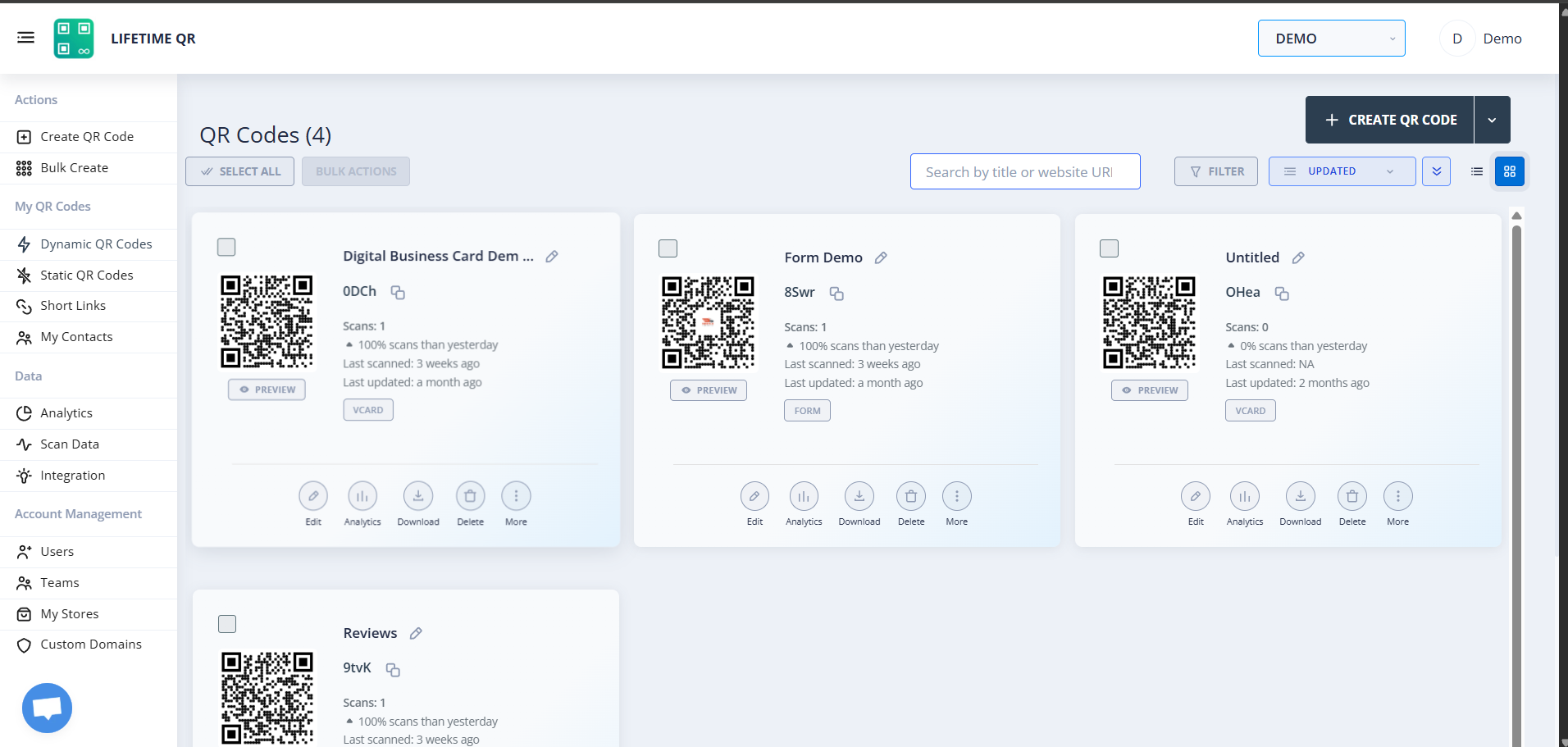
If you're using a dynamic QR code, changing the destination is a simple process that takes less than a minute. Follow these steps:
- 1Verify the QR code is dynamic
Ensure the code you created was dynamic. If you created it on Lifetime QR Codes, you can find it in your dashboard.
- 2Log into your QR dashboard
Access your account and navigate to the "My QR Codes" section.
- 3Change the destination
Click the "Edit" button next to your QR code. Enter the new URL, PDF, or landing page you want the code to point to.
- 4Save updates
Click "Save." The change is instantaneous across the globe.
- 5Test the QR code
Always scan the physical printed code with your phone to verify the redirect is working correctly.
- 6Monitor analytics
Check your dashboard to see scans, locations, and device types for the newly updated destination.
What Is a Permanent QR Code?
A permanent QR code is a dynamic QR code that never expires and requires no ongoing subscriptions to remain active. When you generate an editable QR code on a subscription platform, the code only works as long as you keep paying the monthly fee. With permanent QR codes, you pay a one-time fee and secure QR code ownership for the lifetime of your account.
Because permanent codes are inherently dynamic, you can change their destination URL at any time after printing. This means your lifetime QR code continues working indefinitely, making it the perfect solution for long-term marketing campaigns, printed product packaging, restaurant menus, and event banners where reprinting would be costly or impossible.
Why Choose a QR Code With No Monthly Fees?
Most businesses suffer from subscription fatigue, paying endless monthly fees for software tools they only occasionally use. When it comes to QR codes, those recurring software costs can quickly add up to hundreds or thousands of dollars a year.
Choosing a one-time payment QR code provides immediate, long-term value by eliminating unpredictable costs. A no subscription QR code means you are completely insulated from future price hikes. Most importantly, a QR code with no monthly fees ensures your printed assets are never held hostage. If you miss a payment on a subscription platform, your codes stop working. With a lifetime QR code, your codes are yours to keep, offering complete ownership and peace of mind.
Permanent QR Codes vs Subscription-Based QR Code Platforms
When deciding how to generate your QR codes, it's critical to understand the long-term commitments of standard platforms versus a permanent solution.
| Feature | Permanent Lifetime QR Codes | Subscription Platforms |
|---|---|---|
| One-Time Payment | Yes | No |
| Monthly Fees | Zero | $10 - $50+ per month |
| Long-Term Cost | Low (One-time purchase) | High (Continuous drain) |
| Ownership | You own the routing indefinitely | Platform owns the routing |
| Editable Destinations | Yes, unlimited updates | Yes, but only while subscribed |
| Analytics | Yes, full tracking included | Yes |
| Flexibility | High | Low |
Many businesses prefer permanent QR codes for long-term projects because the ROI (Return on Investment) is substantially higher. You get the exact same premium features—like analytics and editable destinations—without the risk of your codes breaking due to a lapsed subscription.
Why Permanent QR Codes Matter for Printed Materials
Printed materials benefit immensely from permanent editable QR codes because they offer long-term flexibility and significant cost savings. Whether it's product packaging, restaurant menus, event signage, business cards, or marketing flyers, the ability to update destinations means zero reprinting costs. You simply change the link in your dashboard while the physical prints remain intact. Crucially, a lifetime QR code ensures you have full ownership of that routing forever, protecting your physical assets from breaking due to lapsed subscriptions.
Who Owns Your QR Codes?
QR code ownership is one of the most overlooked aspects of digital marketing. When you use a traditional subscription-based generator, you are essentially "renting" the connection between your printed material and your digital content. If you stop paying your monthly fee, the platform deactivates your redirect, rendering your printed codes useless.
With lifetime QR codes, you maintain long-term control. True ownership means your marketing materials are never held hostage by a software company. Businesses should avoid losing access to their QR campaigns at all costs, as a broken QR code damages brand trust and creates a frustrating customer experience. Securing a one-time payment code guarantees that your links belong to you.
How to Know if Your QR Code is Dynamic
Not sure if the code you generated can be edited? Here is a quick checklist:
- Scan it: Use your phone's camera. If you see a short URL (like
qr.link/xyz) pop up before directing to the final page, it is dynamic. - Check your account: Log into the service you used. If it shows scan statistics, it is dynamic.
- Pattern density: Dynamic codes are simpler and easier to scan because they only encode a short redirect link.
Best Practices
- Test updates: Whenever you change the destination of your QR code, scan it from a mobile device to ensure the new page loads correctly.
- Keep destinations active: Ensure the website or landing page you are pointing to is mobile-friendly and online.
- Monitor analytics: Regularly check your scan data to see if your updated destination is performing better than the previous one.
- Organize campaigns: Use tags or folders in your dashboard so you know exactly which physical printed code corresponds to which digital link.
- Verify mobile compatibility: 99% of QR code scans happen on smartphones. Always make sure your new destination looks perfect on mobile screens.
Related Resources
- Dynamic QR Codes: Learn how dynamic routing works and why it’s essential for modern marketing.
- QR Code Analytics: Discover how to track scans, locations, and devices to measure campaign success.
- QR Code Tracking: A deep dive into measuring the ROI of your physical-to-digital marketing funnels.
- PDF QR Codes: Learn how to share menus, manuals, and documents seamlessly with a simple scan.
- Digital Business Card QR Codes: Network smarter with vCard QR codes that instantly save your contact details to a phone.
Conclusion
Permanent QR codes provide the ultimate long-term flexibility. By offering editable destinations and complete scan analytics, you can continuously optimize your campaigns. Most importantly, with a one-time payment and absolutely no monthly fees, you secure true long-term ownership of your marketing assets, ensuring your printed codes never expire.
- Dynamic QR codes can be edited after printing.
- Permanent lifetime QR codes provide long-term flexibility.
- One-time payment eliminates recurring subscription costs.
- Maintain the same printed code while updating destinations as needed.
Frequently Asked Questions
Can you change a QR code after printing?
Yes, you can edit a QR code after printing, provided it is a dynamic QR code. Dynamic QR codes use a redirect URL that can be updated anytime without changing the printed pattern.
What is a permanent or lifetime QR code?
A permanent lifetime QR code is one that never expires and requires only a single, one-time payment instead of an ongoing monthly subscription. It stays active permanently as long as your account exists.
How do I update a QR code without reprinting?
Log into your Lifetime QR Codes dashboard, locate the dynamic QR code you wish to update, and change its destination URL. The printed QR code will immediately redirect to the new link.
Do permanent lifetime dynamic QR codes include scan analytics?
Yes. Our permanent lifetime dynamic QR codes track the number of scans, location data, devices, and operating systems used by the people scanning your codes.
How many times can I change my QR code destination?
You can change the destination URL of a dynamic QR code an unlimited number of times. It will never affect the physical printed code.
What happens to my printed codes if I stop paying a subscription?
If you use a subscription-based QR generator and stop paying, your codes will deactivate and stop working. With Lifetime QR Codes, your one-time payment ensures they never deactivate.
Is there a delay when I update my dynamic QR code?
No, the redirect updates instantly. The moment you save the new destination URL in your dashboard, anyone scanning the printed code will be taken to the new link.
Will the physical appearance of my printed QR code change when edited?
No, the physical pattern of a dynamic QR code never changes. Only the digital destination it points to is updated, meaning your printed materials are always safe.
Do I need to be a technical expert to edit my QR code?
Not at all. Editing simply involves pasting a new link into our user-friendly dashboard and clicking save. If you can copy and paste, you can edit your QR codes.
Can I point my printed QR code to a PDF instead of a website?
Yes, dynamic QR codes can be edited to route users to PDFs, images, digital business cards, app stores, or standard website URLs seamlessly.
What happens if I accidentally delete the QR code from my dashboard?
To protect your printed assets, our platform requires confirmation before deletion. If you do accidentally delete an active code, please contact our support team immediately for recovery options.
Can I edit the design or colors of the QR code after printing?
While you can edit the digital destination URL indefinitely, any physical design changes (like changing colors or adding a logo) to the QR code will require reprinting the code.
Is there a limit to how long my permanent QR code stays active?
No, our lifetime QR codes have no expiration date and remain active as long as your account exists, requiring no renewal fees.
How do I know for sure that my printed code is dynamic?
The easiest way is to scan it. If it briefly routes through a tracking link (like qr.link) before landing on the final page, it is a dynamic, editable code.
Does editing the destination URL reset my scan analytics?
No, your total scan history is preserved. You can continue to see your timestamped analytics to track performance before and after the URL update.
Can multiple people edit the same QR code?
Yes, you can share your account or use team features so that anyone with proper permission can update the printed code's destination.