Current Article
How To Create a Lifetime Short Link QR Code
How To Create a Lifetime Short Link QR Code
Create a lifetime short branded link QR code that redirects scanners to any URL — with scan analytics and the ability to update the destination anytime without reprinting.
A Short Link QR Code encodes a compact, trackable short URL that redirects scanners directly to any destination webpage. Because it uses a dynamic redirect, you can update the destination URL at any time from your dashboard without changing or reprinting the physical QR code.
Common uses:
- Printed flyers, brochures & mailers
- Billboards & outdoor signage
- Product packaging & retail displays
- Event banners & conference badges
- Social media bios & digital marketing
- Business cards & company stationery
Before You Start
Before creating your Short Link QR code, make sure you have the following ready:
- Destination URL: The full target webpage link where scanners should land (e.g.
https://example.com/promo). - Domain Preference: Decide whether you want to use the default short domain or your own verified custom branded domain.
- Custom Slug (Optional): A short, memorable back-half slug for your link (e.g.
brand/summer-sale). - Branding Assets: Your company logo and brand color hex codes for QR design customization (optional).
Always Include https://
Your destination URL must include the full protocol (https:// or http://). A link entered without the protocol will fail to redirect properly when scanned.
Step 1: Login & Select Short Links QR
- Log in to your Lifetime QR Codes account.
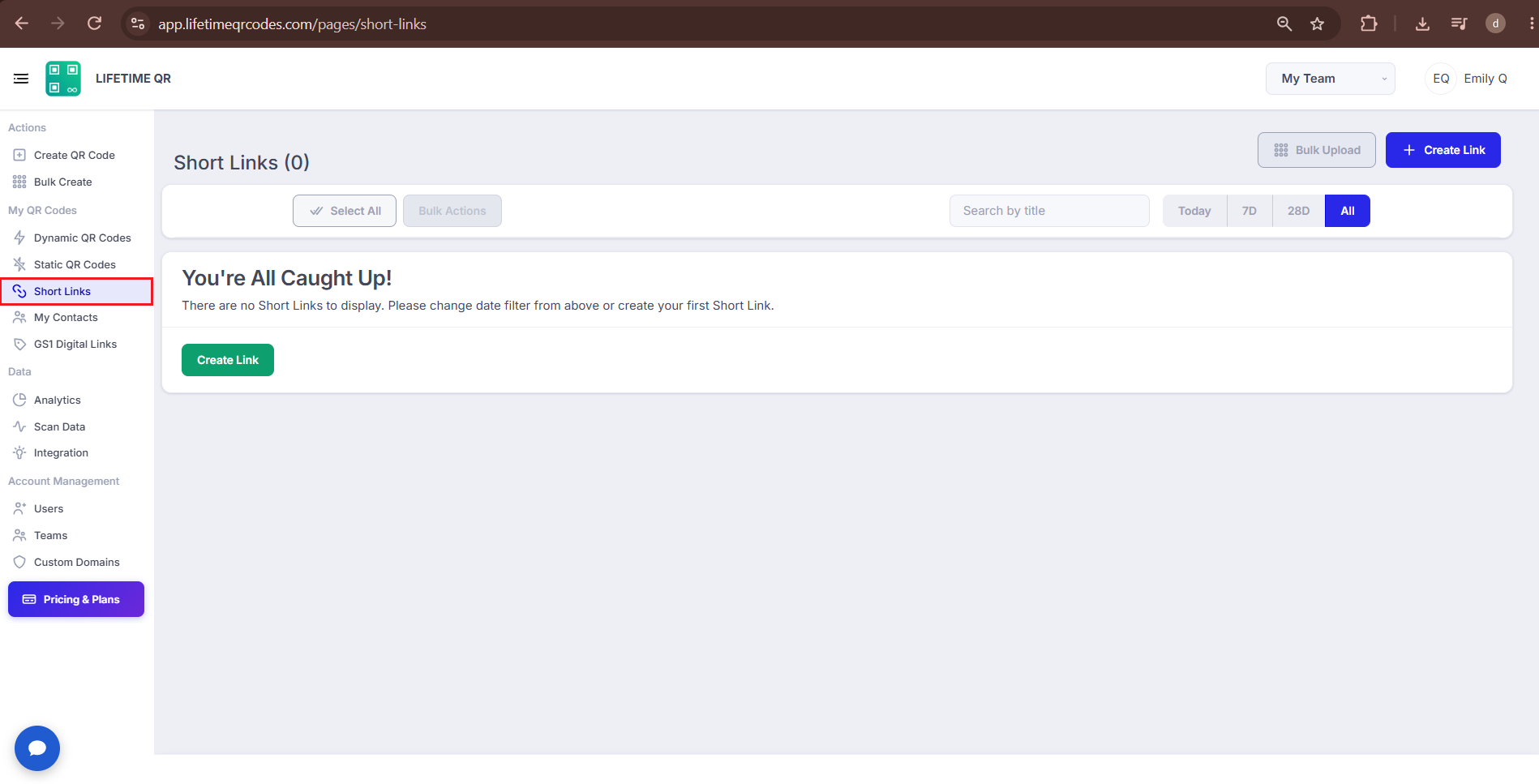
- Click Short Links from the left sidebar.
- This opens the Short Links section, where you can create and manage your short links.
Step 2: Configure Your Short Link
Create your short link, specify your destination redirect address, and optionally set up a branded domain and custom slug.
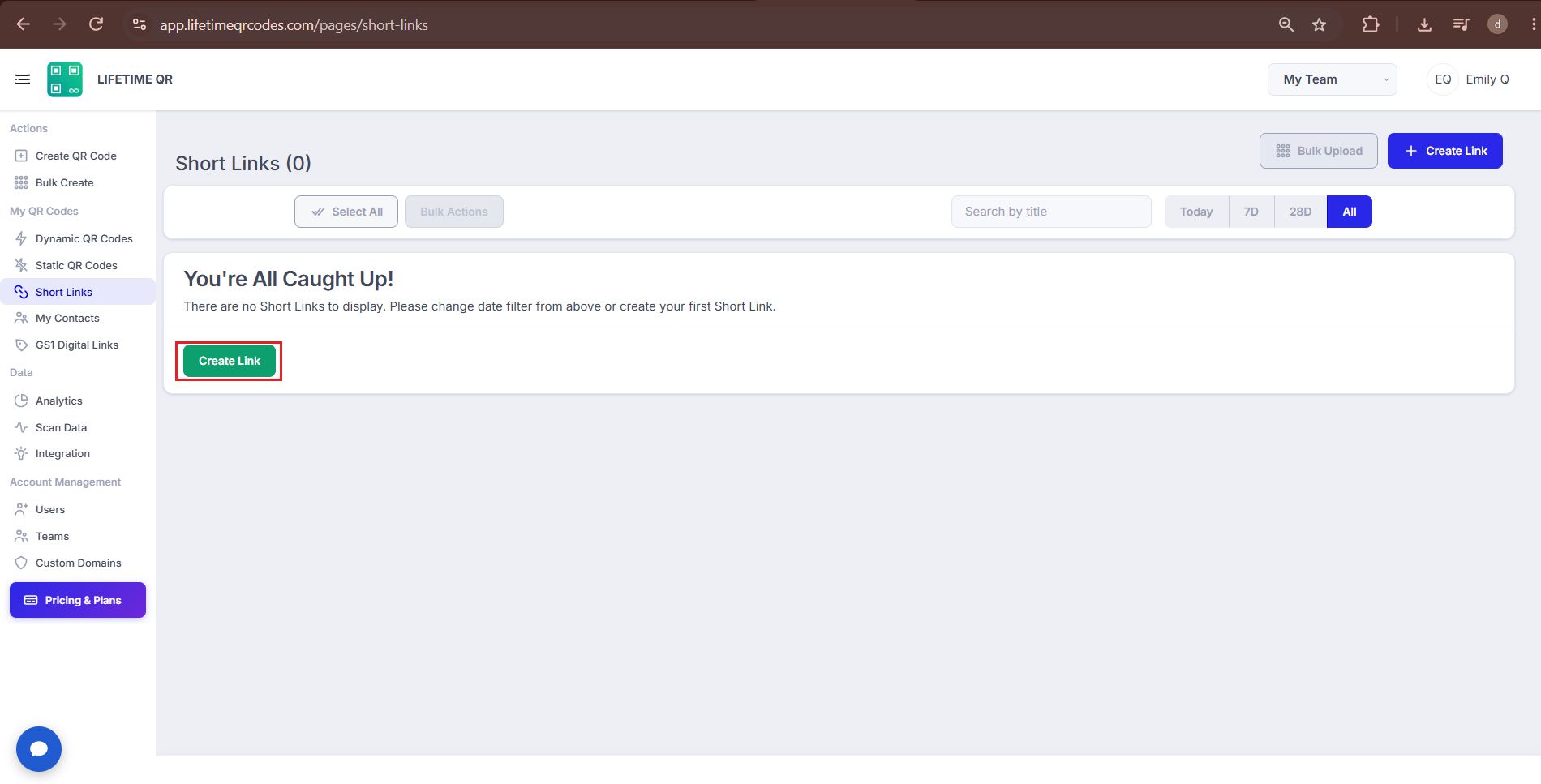
A) Create a New Link
On the configuration screen, click the Create Link button to open the short link configuration fields.
B) Enter Your Redirect URL
Paste your target destination address into the Redirect URL field. This is the exact webpage scanners will reach upon scanning your QR code:
✅ Valid URL
https://yourwebsite.com/promo❌ Wrong URL
yourwebsite.com/promo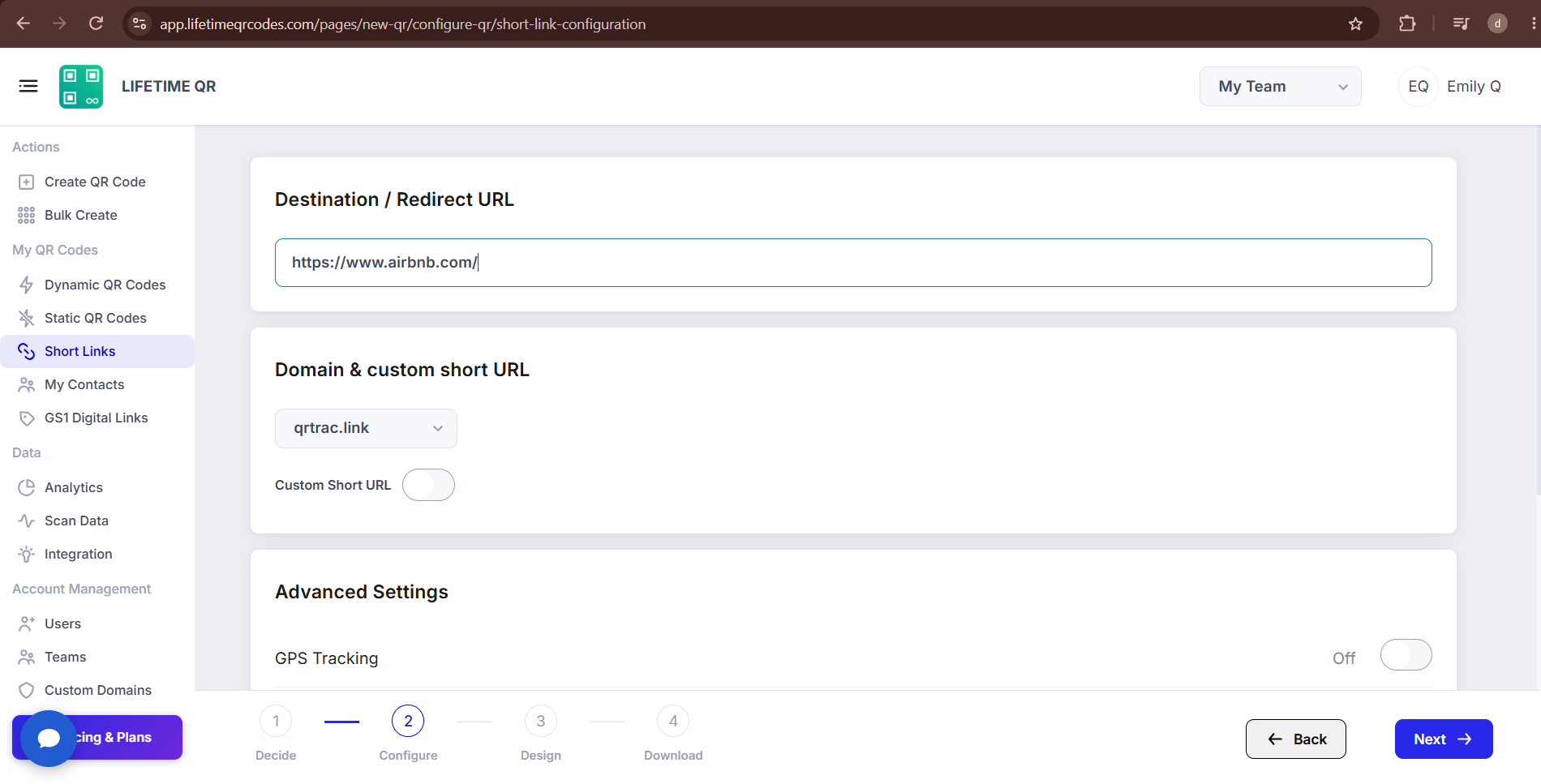
Dynamic QR — Update Destination Anytime
Need to route traffic to a new landing page or seasonal campaign later? Update your destination URL at any time from your Lifetime QR Codes dashboard. Your printed QR code keeps working without reprinting.
C) Configure Domain & Custom Short URL (Optional)
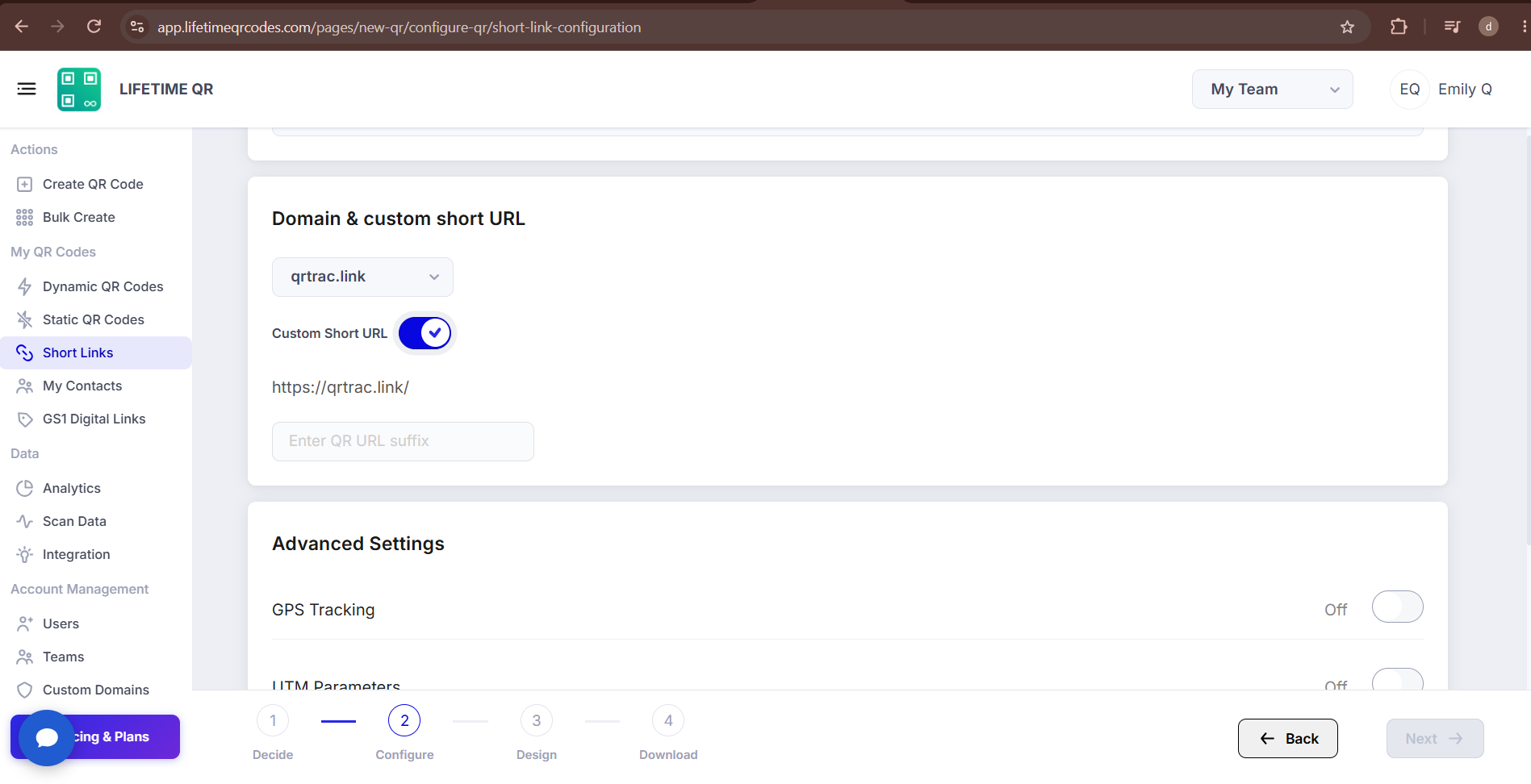
Customize your short link's domain and back-half slug in the Domain & custom short URL section:
- Domain: Choose the standard short domain or select your own verified custom domain connected to your account.
- Custom Slug: Toggle the custom short URL setting to set a personalized slug (e.g.
yourbrand/promo) instead of an automatically generated identifier.
Step 3: Design Your QR Code (Design Phase)
Click Next to customize the visual appearance of your QR code:
- Templates: Select from pre-designed aesthetic layouts.
- Logo: Upload your company logo or brand icon to display in the center of the QR code.
- Pattern & Shapes: Choose custom data dot styles and corner eye marker shapes.
- Colors: Select contrasting foreground and background colors to match your brand guidelines.
- Frames: Add a frame with a clear call-to-action (e.g. "SCAN TO VISIT" or "SCAN ME") to drive engagement.

Step 4: Review & Download (Download Phase)
Click Next to reach the confirmation screen. Review your QR code preview, enter a recognizable title, and copy your shareable short URL.

Click Download QR to open the export options and choose your file format:
- PNG: High-resolution raster format, ideal for digital screens, email templates, and websites.
- JPEG: Compact raster format suitable for digital sharing and office documentation.
- SVG: Lossless vector format best for professional printing, large posters, packaging, and banners at any scale.
- WEBP: Lightweight modern web format designed for fast-loading websites and applications.

Pro Tip
Always test your QR code with a smartphone camera straight from your screen before printing. Confirm that the short link resolves quickly and redirects smoothly to your destination webpage.
Common Mistakes
- ❌ Pasting a destination URL without https:// or http://.
- ❌ Printing without testing the redirect on a physical smartphone camera.
- ❌ Entering a private or login-restricted internal URL.
Launch Checklist
- Destination URL tested and active
- Domain and custom short URL configured, if needed
- Camera scan test passed successfully
What Users See After Scanning
When users scan the Short Link QR Code, a link prompt appears on their smartphone. Tapping the link opens the mobile browser and redirects them to the destination webpage.
The Short Link automatically forwards users to the URL you configured.
Frequently Asked Questions
Can I change the redirect URL after printing the QR code?
Yes. Because Short Link QR Codes are dynamic, you can update the destination URL at any time from your Lifetime QR Codes dashboard without changing or reprinting the physical QR code.
Can I use my own custom domain for the short link?
Yes. You can connect and configure your own custom domain in your account settings, allowing your short links to display your brand domain instead of the default domain.
Can I track scans and visitor analytics?
Yes. The analytics dashboard provides real-time metrics for every short link QR code, including scan counts, unique scanners, device types, operating systems, and geographic locations.
Can I share the short link directly without the QR code?
Yes. Every Short Link QR Code includes a shareable text URL that you can copy and paste into social media bios, email signatures, messaging apps, and online marketing campaigns.
What happens if I enter an invalid redirect URL?
If an invalid or broken URL is entered, scanners will encounter a browser error. Always test your destination link in an incognito browser window to make sure it is publicly accessible before finalizing your QR code.
Can I customize the visual design of my Short Link QR code?
Yes. You can customize your code using curated templates, custom foreground and background colors, brand logos, data dot patterns, corner eye markers, and call-to-action frames.